Essay
I Moved My AI Chat's Embeddings From OpenAI to a Raspberry Pi in One Afternoon

My personal website has an AI chat on the front page. You can ask it things like "what kind of ML work have you done?" or "what's the latest thing you built?", and it answers from my actual blog posts, projects, and resume. It's useful, but until yesterday it had a small annoyance: it depended on the OpenAI API to generate embeddings — those 1,024-dimensional math vectors that the chat uses to figure out which of my writings are relevant to your question.
Every chat message you send goes through two AI systems:
- An embedding model that turns your question into a vector, so it can be compared (as math) to every blog post and project I've written.
- A chat model that reads the top matches and writes you an answer.
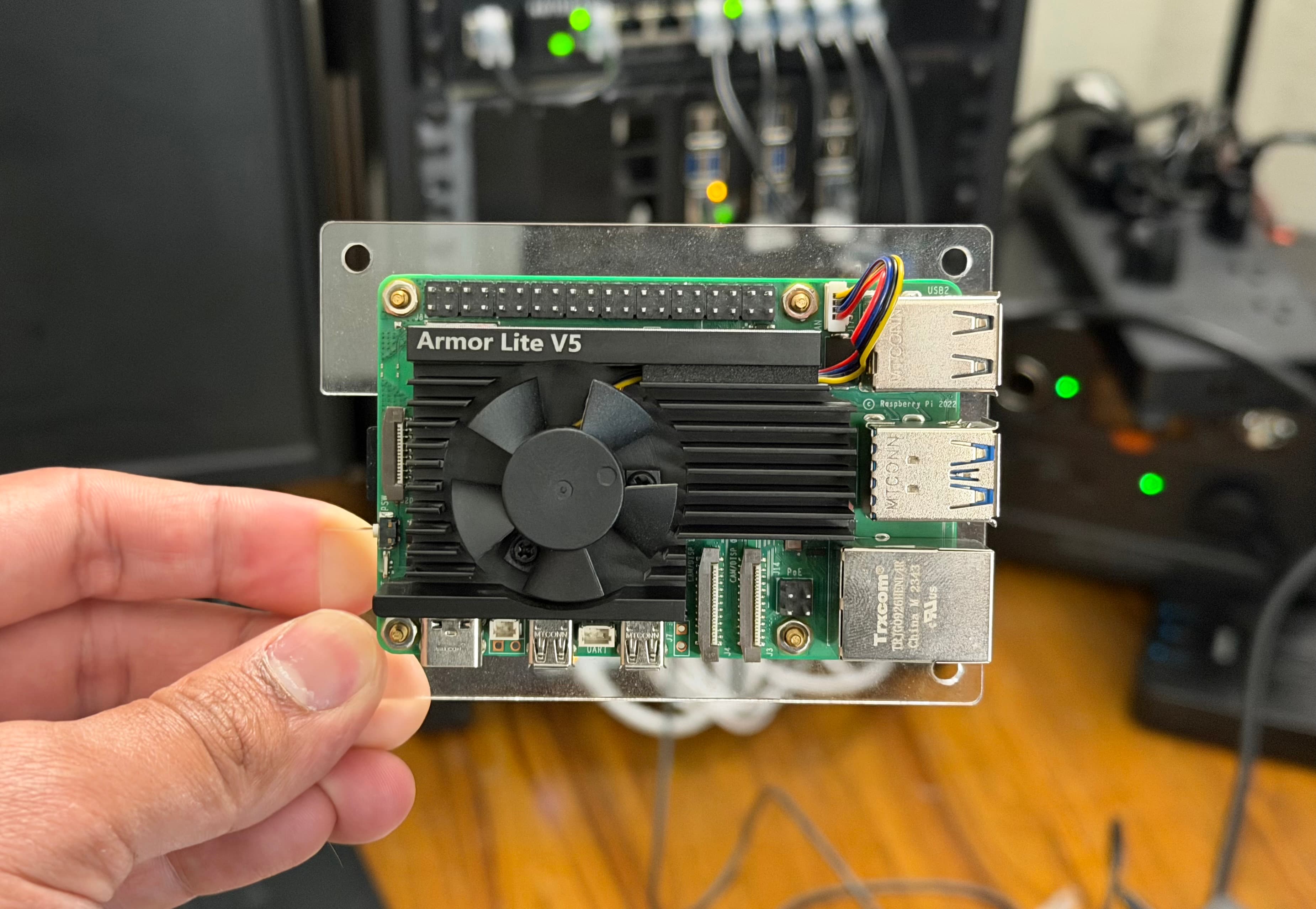
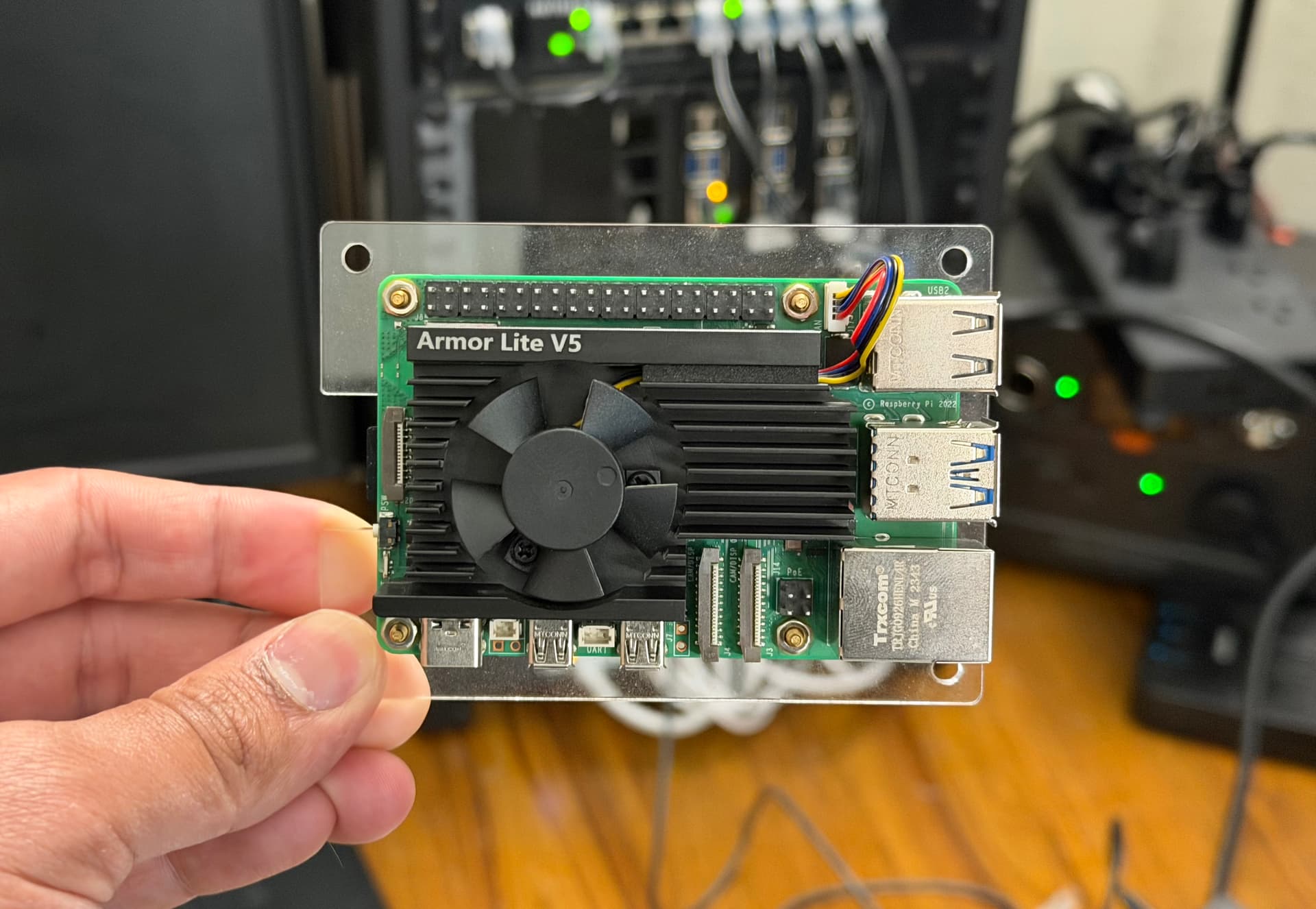
I was already using Groq for step 2 (fast, cheap, and the current leader for low-latency inference). Step 1 was still pinned to OpenAI's text-embedding-3-small, which costs about $0.02 per million tokens. At my traffic, that's maybe a dollar a year. Not a financial issue. But I had a Raspberry Pi 5 sitting on a shelf doing almost nothing, and I'd been curious whether it could run a modern embedding model on its own.
Spoiler: it can. And it took about one afternoon to wire up end-to-end, with a genuinely reasonable security model. Here's what I did, what I learned, and the architecture that any of you could copy in an evening.
The high-level picture
Here's what a chat message looks like now when someone asks a question on my site:
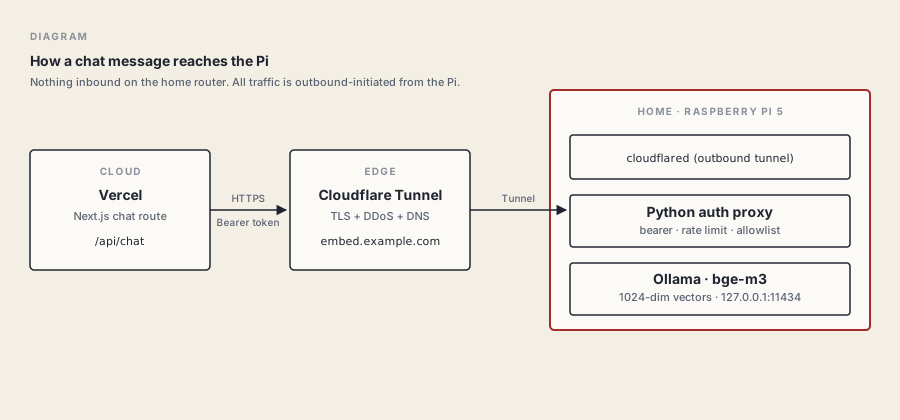
The key thing that makes this safe to run on a home network: nothing inbound on my router. The Pi opens an outbound connection to Cloudflare, and Cloudflare's edge hands requests back through that connection. If someone tries to attack my home IP directly, they can't even see it — they only see Cloudflare. And the only endpoint that exists on the whole domain is a single URL that requires a bearer token I generated.
I'll break each layer down, but the punchline is: a chat query on my site now hits this stack, gets a 1,024-dimensional vector back in about 310 milliseconds, and uses that to find the right posts to feed Groq. The Pi sits at near-zero CPU most of the time and spikes only when it's doing useful work.
Why bother? (the honest list)
Writing this up, I want to be transparent about the reasons, because not all of them are great:
- Curiosity. I wanted to know if it would work. Reason enough for a personal project.
- Learning. Running a model in production, even a small embedding one, is a real skill. Cloudflare Tunnel, systemd hardening, token-bucket rate limiting, proxies — I touched all of these for a real purpose, not a tutorial.
- Ownership. My question embeddings no longer leave infrastructure I control. If OpenAI changes pricing or deprecates a model, I don't care.
- Cost. Effectively zero now. Previously ~$1/year. This is the least important reason.
- Feature flexibility. I can swap models, batch differently, or tune chunk strategies without a vendor's consent.
Things this is not a win for:
- Latency during chat: about the same (~300ms warm).
- Latency during deploys: went from 40 seconds to 9 minutes. More on that in a bit.
- Reliability. My Pi being online is now load-bearing. OpenAI's SLA beats my home internet.
The model: bge-m3
The open-source embedding space has gotten absurdly good in the last year. Three models that would all be fine here:
| Model | Params | Dims | Context | Notes |
|---|---|---|---|---|
nomic-embed-text |
137M | 768 | 2K | Lightweight, very fast, good enough for most things |
mxbai-embed-large |
335M | 1024 | 512 | Higher quality, middle weight |
bge-m3 |
568M | 1024 | 8K | Top-tier retrieval, long context, multilingual |
I picked bge-m3. It's made by the Beijing Academy of Artificial Intelligence, has been near the top of the MTEB leaderboard for months, and its 8,192-token context window means it can embed entire blog posts in a single call instead of chopping them into tiny fragments. On a Pi 5's ARM cores, it takes about 310 milliseconds to embed a query — I'll take that, it's imperceptible in a chat response.
The model is open-source (Apache 2.0), about 1.2 GB on disk, and sits in RAM happily on an 8 GB Pi 5.
The runtime: Ollama
Ollama is the easiest way to run open models on your own hardware. It handles the binary, the server, the model download, the cache, everything. Install it (downloading the official ARM64 binary from their GitHub releases is the cleanest path — skip the curl | sh installer if you're picky about that), point a systemd unit at ollama serve, and you have a local HTTP API that speaks JSON.
# On the Pi, once Ollama is running
ollama pull bge-m3

# Smoke test
curl -s http://127.0.0.1:11434/api/embed \
  -d '{"model":"bge-m3","input":"does this thing work"}' \
  | python3 -c "import sys,json; print('dims:', len(json.load(sys.stdin)['embeddings'][0]))"
# dims: 1024
Two things I did to make it behave well long-term:
Keep the model hot. Ollama unloads models from RAM after a period of idleness. That means the first request after a quiet hour is slow (3–5 seconds to reload the weights). I set OLLAMA_KEEP_ALIVE=24h in the systemd unit's environment. Now it stays loaded all day.
Bind to localhost only. Ollama's HTTP API has endpoints for chat, generation, and pulling new models. You absolutely do not want any of those reachable from the public internet. I have OLLAMA_HOST=127.0.0.1:11434. The Pi itself is the only thing that can talk to Ollama directly.
The security layer: a tiny auth proxy
Ollama deliberately doesn't have authentication. Their assumption is that you're running it on a trusted machine. Fair. But I need to call it from Vercel, and the public internet is not a trusted machine.
So I wrote a ~70-line Python HTTP server, pure standard library, that sits in front of Ollama and does four things:
- Check for a bearer token on every request. The token is a 32-byte random hex string stored in an env file on the Pi (mode 600, root only).
- Path allowlist. Only
POST /api/embedworks. Every other path returns 404, even with the right token. So even if the token leaked, an attacker couldn't hit/api/chat,/api/generate, or/api/pull(the one that could download arbitrary models to my Pi). - Rate limit with a token bucket. Currently 30-request burst, refilling at 6 per minute. A legitimate chat session uses maybe 1 request per minute. A rebuild of my whole vector index uses 14 in 30 seconds. Both fit comfortably. A stolen secret being abused to DoS my Pi's CPU does not.
- Forward the request body to Ollama on
127.0.0.1. Stream the response back.
I run this as a separate systemd service with DynamicUser=yes, NoNewPrivileges=yes, PrivateTmp=yes, ProtectSystem=strict, ProtectHome=yes. If someone ever did find a bug in my Python code, they'd be stuck in a maximally-restricted user with no filesystem access and no other privileges.
Is this overkill for a personal site? Probably. It's also 70 lines of code and took 20 minutes. Security in layers is cheap when the primitives are solid.
The door to the internet: Cloudflare Tunnel
This is the part that makes running things from home practical. Cloudflare Tunnel — the thing formerly known as Argo Tunnel — runs a small daemon (cloudflared) on your Pi. That daemon dials out to Cloudflare's edge, establishes a persistent outbound connection, and then Cloudflare routes requests to whatever hostname you configured through that connection.
What this means in practice:
- No ports opened on your router. Inbound firewall stays fully closed. You don't even need a static IP.
- Free TLS. Cloudflare terminates HTTPS at the edge using a cert Cloudflare manages.
- Free DDoS protection. Standard Cloudflare free-plan stuff.
- No public exposure of your home IP. Anyone hitting the hostname sees Cloudflare's IP, not yours.
The setup is basically:
cloudflared tunnel login                    # browser-based auth
cloudflared tunnel create embed-pi          # creates credentials
cloudflared tunnel route dns embed-pi embed.example.com
cloudflared service install                 # systemd setup
…plus a small config.yml file that says "route embed.example.com to http://127.0.0.1:11435" (where my auth proxy is listening). Cloudflare has their own quickstart that I'm not going to duplicate here; it's genuinely excellent.
The thing I want to emphasize: once this is running, all the security properties come for free. My home internet is reachable from the public internet only through this one narrow path, protected by one bearer token, protected again by Cloudflare's edge.
Wiring it into Vercel
The app changes were embarrassingly small. One function:
const res = await fetch(`${process.env.EMBED_URL}/api/embed`, {
  method: "POST",
  headers: {
    "content-type": "application/json",
    "authorization": `Bearer ${process.env.EMBED_SECRET}`,
  },
  body: JSON.stringify({ model: "bge-m3", input: userQuery }),
});
const { embeddings } = await res.json();
const queryVector = embeddings[0];
That's it. I deleted the OpenAI SDK import (for embeddings — Groq still handles chat), swapped this block in, set the two env vars in Vercel's project settings, and redeployed. No other code changes.
The build-time pipeline
Here's the part the OpenAI setup hid from me that the Pi setup makes visible.
On every git push, Vercel rebuilds my site. Part of the build is a prebuild step that re-embeds my entire corpus — every blog post, every project, every section of my resume — and bakes the resulting vectors into the deploy bundle. This is the static data the chat's RAG system searches against. Every user's question is compared against this pre-built set.
With OpenAI, this step took about 30 seconds: a handful of API calls to a colossal GPU fleet that responds in milliseconds. With the Pi, it's different. I pulled the numbers from one of my real Vercel build logs, and it's a useful dose of honesty:
| Batch | Chunks embedded so far | Time elapsed |
|---|---|---|
| 1 | 8 / 111 | 58 seconds (cold load) |
| 2 | 16 / 111 | 1 min 48 s |
| 3 | 24 / 111 | 2 min 14 s |
| … | … | … |
| 11 | 88 / 111 | 7 min 34 s |
| 12 | 96 / 111 | 7 min 45 s |
| 13 | 104 / 111 | 7 min 57 s |
| 14 | 111 / 111 | 8 min 7 s |
The full build — including next build compiling the React app, generating 45 static pages, and rendering the RSS feed — takes about 9–10 minutes now, vs. the old 40-second builds. That's the honest cost.
Notice the pattern: later batches get faster, not slower. That's the model warming up. Ollama's first forward pass after a long cold stretch includes weight-loading and CPU-cache population. By batch 13, the Pi is in full stride at roughly 1.5 seconds per chunk.
Would I save time by keeping the model permanently in RAM on Vercel? Sure — but Vercel's build servers are ephemeral, so the "cold start" isn't really cold; it's just a new connection to the Pi, which is already warm. The bottleneck is pure ARM-CPU inference time.
Is a 9-minute build acceptable? For a personal site I push a few times a month, absolutely. For a team shipping 30 times a day, no.
While I was in there: actually better retrieval
Once the embedding infrastructure was my own, I let myself improve the how-we-retrieve side of the chat, which was using a simple dense-only cosine search. Three changes, all small, all measurable:
Hybrid retrieval. Dense embedding search is great at paraphrases ("ML work" finds "machine learning"). It's surprisingly weak at proper nouns and rare technical terms — asking "what have you built with Shapr3D?" used to retrieve related CAD content but sometimes missed the specific posts about Shapr3D. I now run dense search and classic BM25 lexical search in parallel and combine the results with Reciprocal Rank Fusion, a technique from Microsoft that's basically "average the ranks, not the scores." The hybrid query catches both kinds of relevance.
Top-K expansion. I used to retrieve the top 5 chunks and send ~8,000 characters to the LLM. Now I retrieve the top 15 and send 16,000. The LLM I'm using (groq/compound) has plenty of context window; giving it more evidence and letting it filter is often better than pre-filtering aggressively on my side.
Section-aware chunking. Previously, my index was chunked by character count, so a single blog post might be cut mid-paragraph. Now it splits at markdown ## and ### headings first, so each chunk is a coherent topic. The most striking effect: my resume went from 5 chunks to 16, because each section (education, experience, skills, projects) is now independently retrievable. Ask a question about one section, get that section, not the blurry average of all five.
Total effect: my index grew from 84 chunks to 111, and retrieval quality — tested against a handful of realistic questions — is noticeably better, especially for questions about specific proper nouns and for resume-specific queries. The hybrid approach alone was the biggest single improvement.
What I'd tell someone else thinking about this
Start with Ollama, skip everything else first. The whole "does this model work on my hardware?" question is answered in 10 minutes with ollama pull <model> and a single curl call. If the answer is yes and the latency is acceptable, the rest is just plumbing. If it's no, you've wasted nothing.
Cloudflare Tunnel is the right primitive. I've seen people try to expose home services with port forwarding, dynamic DNS, custom VPNs, and ngrok. All of those introduce either risk or ongoing cost or both. Cloudflare Tunnel is free, outbound-only, and gives you proper HTTPS without certificate hassles. Use it.
Don't expose Ollama directly. Put something in front of it, even if that something is 70 lines of Python. At minimum you want bearer-token auth and a path allowlist. Ollama has privileged endpoints (model pull, file operations) you never want public. A tiny proxy is the simplest, most auditable way to keep those internal.
Rate-limit after authentication. If you rate-limit before the auth check, anyone can burn through your budget with bogus tokens. Check the token first, then the bucket. 401s should be cheap to return and not count against anything.
Pick a model that fits your hardware. I went with the biggest-and-slowest-but-best because I care more about quality than speed, but at some hardware sizes you're going to be happier with nomic-embed-text. A 310ms warm embedding on a Pi is great. A 310ms cold embedding on a Raspberry Pi 4 would not be. Benchmark your specific combination.
Know that your build is no longer other people's problem. Free tier Vercel will still run the build even if it takes 9 minutes. But if you're on a team or use CI minutes strictly, this is a real cost. For a personal site I deploy weekly, I don't care; for a startup's landing page I deploy hourly, I would.
Document it while you still remember. I wrote a runbook for this setup immediately — where the secret lives, how to rotate it, which systemd services run, how to swap the model. In six months I will have forgotten all of it. The part of your brain that remembers systemd unit paths is much smaller than you think.
The security model is honestly better than most indie SaaS setups. You own the whole chain, the bearer secret is a 256-bit random value, the blast radius of any compromise is bounded to "CPU DoS of a $80 Pi," and no ports on your home network are open. Feel fine about this.
The tradeoff, honestly
My website's AI chat now runs on infrastructure I can physically unplug. The query latency is unchanged. The deploy latency is ~13x worse. The cost is effectively zero. The thing that was abstract (embeddings happening somewhere in OpenAI's data center) is now concrete (a fan spinning up on a shelf for 8 minutes when I push code). I can't A/B test that feeling against keeping the API, but it's made the whole system feel more mine.
If you've been putting off trying this because it seems hard, I promise it isn't. One afternoon. One domain you already own. One Pi. One shared secret. That's the whole setup.
Resources
- Ollama — the runtime, installs cleanly on ARM64 Linux.
- bge-m3 on Hugging Face — the model card with benchmarks and paper.
- Cloudflare Tunnel quickstart — setup walkthrough direct from the source.
- MTEB leaderboard — open embedding model benchmarks, useful for picking what fits your hardware.
- Reciprocal Rank Fusion explained — the one-paragraph version of why hybrid retrieval works.
- This site's RAG runbook — my actual operational notes for this exact setup, if you want the detailed version.